
This Cheque Store guide covers quickbooks cheques for Toronto and Greater Toronto Area businesses. Read on for quickbooks cheques best practices, compliance notes, and Cheque Store recommendations on quickbooks cheques.
Order QuickBooks-compatible business cheques from $69, alignment-tested for QuickBooks Online, QuickBooks Desktop Pro, QuickBooks Desktop Premier, QuickBooks Desktop Enterprise, and QuickBooks Self-Employed. Printed in-house at our Toronto facility with 24-hour turnaround, delivered next business day across the GTHA and Canada-wide. If you run any version of QuickBooks for your Canadian business, you can either pay Intuit’s checks.com prices for cheque stock (40 to 60 percent above market) or order the same CPA-006 compliant cheques from us at $69 for 250 with guaranteed QuickBooks template alignment. This guide walks you through which cheque format to buy, how to set up QuickBooks to print to it, and why our Premium Laser Business Cheques are the most-ordered QuickBooks-compatible cheque in Canada.
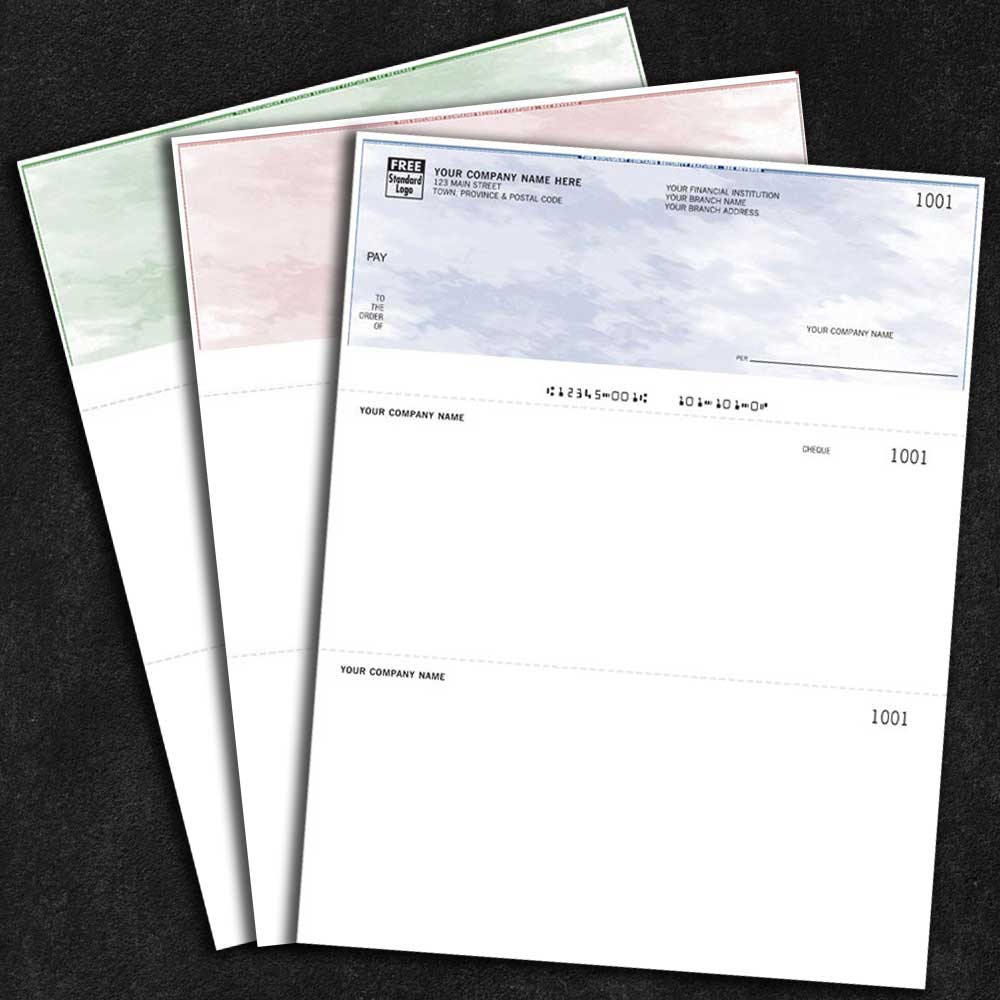
QuickBooks prints to a standardized voucher cheque format: one cheque at the top of the page, two stubs below it (one for the payee, one for your records). This is the dominant cheque format for Canadian SMBs and the one our Premium Laser Business Cheques ($69) and Extreme Security Laser Cheques ($89) are pre-configured to match.
Both QuickBooks Online and all versions of QuickBooks Desktop (Pro, Premier, Enterprise, Accountant) print to this standard voucher format. The MICR encoding on the bottom of our cheques is positioned to match exactly where QuickBooks expects to lay the payee name, amount, date and memo. The result: your cheques print correctly on the first run, with zero alignment fiddling.
All major QuickBooks Canadian versions use the same voucher cheque format and our cheques work across all of them. Here is the breakdown:
If you are on any of the first 5 versions, our Premium Laser ($69) or Extreme Security ($89) cheques work out of the box. If you are on Self-Employed or do not run accounting software at all, our Manual Business Cheques ($49) are the better choice.
QuickBooks treats both formats identically, the difference is the security profile of the cheque stock itself, not how QuickBooks prints to it. The decision is based on what you are paying:
| Your QuickBooks workflow | Best cheque | Why |
|---|---|---|
| Routine SMB AP, cheques under $2,000 | Premium Laser ($69) | Standard security features (microprint, void pantograph, chemical paper) are appropriate; the cheaper format reduces per-cheque cost. |
| Mid-volume AP, cheques routinely $5,000,$50,000 | Extreme Security ($89) | The $20 upgrade adds heat-sensitive logo, holographic foil and controlled paper, pays for itself the first time alteration or counterfeiting is attempted. |
| High-value supplier cheques, $50,000+ | Extreme Security ($89), essentially mandatory | Banks may flag premium-laser-grade cheques on high-value disbursements as elevated fraud risk. |
| Trust accounts (law firms, real estate brokerages) | Extreme Security ($89) | Required best-practice fraud control for trust-fund disbursements. |
| Property management, condo corporations | Extreme Security ($89) with 3-part deposit slips | High-volume rent and contractor payments; tamper-evidence matters. |
Both work identically with QuickBooks. The choice is about your fraud exposure, not your software.
Intuit operates a cheque storefront at checks.com (and integrates ordering directly inside QuickBooks). The cheques they sell are made by third-party Canadian printers and resold at substantially higher prices than ordering direct.
The comparison:
The bottom line: same cheques, lower price, faster turnaround, Canadian support. The only reason to order through QuickBooks directly is convenience, and you pay heavily for that convenience.
If you use QuickBooks for AP, you almost certainly also need deposit slips for the AR side. Common combined orders for QuickBooks users:
All four products ship from our Toronto facility in one shipment, personalized with the same bank info.
QuickBooks-compatible cheques ship next business day from our Toronto facility to every postal code across the GTHA: Toronto, Mississauga, Brampton, Markham, Vaughan, Richmond Hill, Oakville, Hamilton, Burlington, Milton, Oshawa, Whitby, Ajax, Pickering, Aurora, Newmarket, Stouffville, Halton Hills, Caledon and Clarington.
Canada-wide standard Canada Post shipping for businesses outside the GTHA. Most Canadian addresses receive their cheques within three to five business days of proof approval.
Yes. Our Premium Laser and Extreme Security cheques are pre-aligned for the standard QuickBooks voucher cheque template used by QBO, QuickBooks Desktop Pro, Premier, Enterprise and Accountant. The cheque prints correctly on the first run, with payee, amount, date and memo positioned exactly inside the pre-printed cheque area.
Almost never. Our cheque dimensions and MICR positioning match QuickBooks defaults exactly. In the rare case your printer has a small calibration offset (a few millimetres), QuickBooks Desktop has built-in alignment fine-tuning under File → Printer Setup → Cheque/Paycheck → Align. QBO uses fixed templates and almost never needs alignment work.
Voucher cheques have one cheque at the top of the page and two stubs below, the format QuickBooks defaults to for business payments. Standard cheques (3-per-page) are used for personal cheques, not business. We sell the voucher format because that is what QuickBooks business users need.
No. Any standard laser or LED printer (HP, Brother, Canon, Xerox) will print our cheques correctly. You do NOT need a dedicated MICR printer, we print the MICR encoding onto the cheque at our Toronto facility before shipping, so your printer only fills in payee, amount, date and memo.
Yes. CPA-006 compliant cheques clear at every Canadian bank, credit union and Caisses populaires, RBC, TD, BMO, CIBC, Scotiabank, HSBC, National Bank, Equitable, and every credit union. Zero CPA-related rejections in 25 years.
Yes. We offer consolidated invoicing with net-30 terms for bookkeeping and accounting practices managing multiple client QuickBooks files. Each client’s bank info is stored separately for fast reorders, and your firm receives a single monthly invoice. Common with GTA bookkeepers serving SMB clusters.
Intuit has not changed the standard QuickBooks voucher cheque format in over 20 years, the format is essentially frozen. If a future update changes the dimensions, we will update our cheque stock to match before the update reaches Canadian users, so existing customers maintain compatibility on reorder.
Yes, both versions use the same voucher format and the same cheque stock works for both. If you maintain a hybrid workflow (Online for daily AP, Desktop for monthly close), order one batch and use it across both.
Three ways to order:
Order Premium Laser, $69 Order Extreme Security, $89
Trusted by 15,000+ Canadian QuickBooks users since 2001. CPA-006 compliant. Printed in Toronto. Shipped Canada-wide. 40-60 percent below Intuit checks.com pricing.
If you operate in one of these sectors, our industry stationery guides cover the specific products and workflows that fit your business:
For additional Canadian print industry context, see the CPA Canada resources on business stationery standards.


Talk to experts
+1. 647. 501. 7200
Have any Question
Mail us
[email protected]
Copyright © 2024 Cheque Store.
Designed and Developed by Faster Better Websites | Powered by Motionhosting.com | Ranked by SEORank.club | TERMS AND CONDITIONS | PRIVACY POLICY